
Configure gift purchases
Enable customers to buy products for others using separate recipient details and a personalized message.
When you enable Gift Purchases, customers can complete one-time payments on behalf of separate recipients.
After selecting the Gift Purchase checkbox at checkout, the customer enters the recipient’s contact information. They can also include a personalized message of up to 400 characters. FastSpring sends the message and all cart items to the recipient.
Limitations: Gift Purchases do not currently support subscriptions. If a subscription product is added to the cart, the Gift Purchase checkbox will not be displayed.
The sections below outline how to enable gift options, manage recipient fulfillments, and utilize developer tools. Select a card or use the TOC on the right to jump ahead.
Activate gift options on your checkouts and customize the gift icon.
View the separate email notifications sent to purchasers and recipients.
Locate recipient details within the FastSpring app order records.
Configure webhooks, API data, and SBL pre-population for gifts.
Enable gift purchases
Gift Purchases are disabled by default. You must enable them individually for each store checkout.
- In the FastSpring app, go to Checkouts > Web Checkouts.
- On the checkout you want to configure, click Settings.
- Go to the Checkout tab on the left.
- Under the Purchaser Settings section, select Enable for Allow Gift Purchases.
- Click Save.
- In the FastSpring app, go to Checkouts > Popup Checkouts.
- On the checkout you want to configure, click Settings.
- On the Checkout tab, scroll to the Purchaser Settings section.
- Select Enable for Allow Gift Purchases.
- Click Save.
Note: You can control the color of the gift icon shown at the top of the completion page. Navigate to Settings > Styling > Completion Page > Color of the Successful Order Checkmark on the Completion Page.
Accepted payment methods
Customers can complete a gift purchase using the following payment methods:
- Credit / Debit card
- PayPal
- Amazon Pay
Fulfillments and receipts
FastSpring generates two distinct fulfillments for every gift purchase: one for the buyer (receipt) and one for the recipient (product delivery).
Sent to: The customer who paid for the gift.
FastSpring sends the Gift Purchaser Receipt to the buyer. This email includes payment confirmation and billing details, but does not contain the product fulfillment links or license keys.
The purchaser sees this same information in their Account Management Portal.
Sent to: The person receiving the gift.
FastSpring sends the Gift Recipient Fulfillment to the recipient. This email contains the Gift Message, product download links, and license keys.
Recipients can access this fulfillment via email or their own Account Management Portal. Importantly, they do not see the price or the purchaser's payment information.
View gift purchases
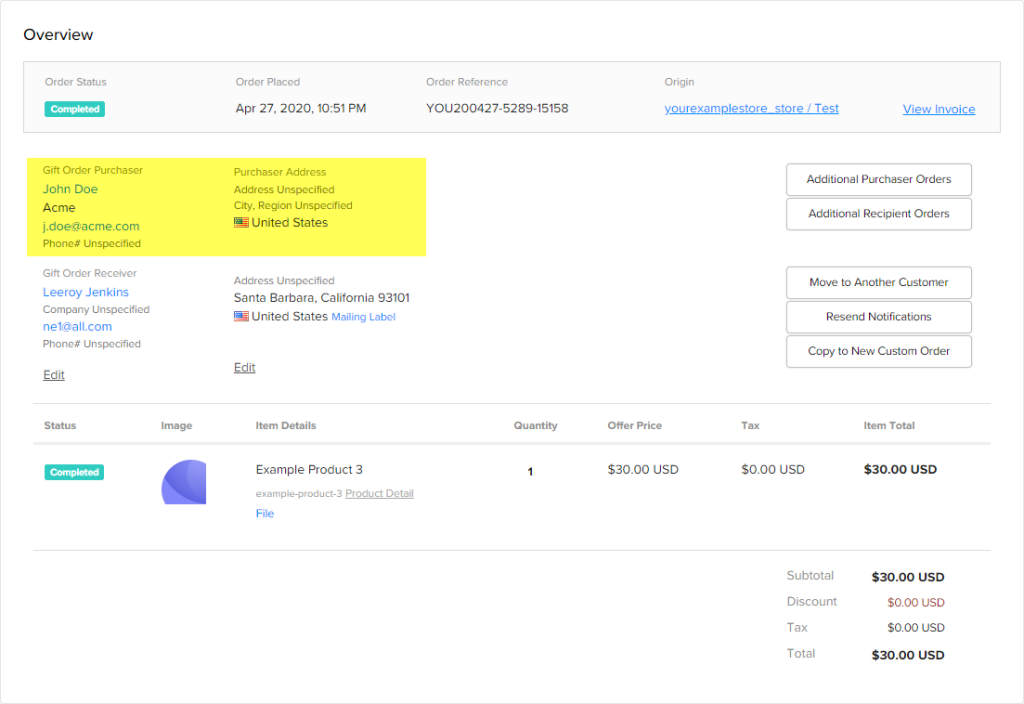
You can verify if an order was a gift by viewing the transaction details in the FastSpring app on the Order Details page. FastSpring displays both the purchaser and recipient information within the Overview section.
Developer resources
Use the tabs below to configure webhooks or implement Store Builder Library (SBL) pre-population for gift orders.
FastSpring contains gift recipient information in the recipients array. This array displays the same information as the contact object for normal purchases.
Note: If Webhook Expansion is enabled, the
recipientsarray will include theaccountsobject.
If the consumer.email field differs from the recipient.recipient.email field in the payload, the order is a gift purchase.
There are three ways you can use the Store Builder Library (SBL) to pre-populate recipient information.
Implementation methods
- Methods: Prefill unauthenticated gift recipient information to the browser session. This does not hide the input fields during checkout.
- Session Objects: Include the
recipientobject in your session object. FastSpring prefills known recipient information, though the customer can still edit it. - Pass a Secure Request: Pass the
recipientobject within your encrypted payload. This authenticates recipient information and stores it with the order. FastSpring does not display the information at checkout.
Error responses
400 recipient-and-purchaser-country-must-match: The purchaser’s country does not match the recipient’s country.400 memo-exceeded-limit: The gift message exceeds the 400-character limit.
Updated 10 months ago