
UPI AutoPay
FastSpring supports UPI AutoPay for fully automated subscription renewals in India.
UPI AutoPay is not enabled by default. Contact FastSpring Support to enable it for your store.
UPI AutoPay extends the Unified Payments Interface (UPI) to support auto-renewing subscriptions for buyers in India. Subscriptions are charged automatically against a recurring payment mandate the buyer authorizes in their UPI app (such as PhonePe, Paytm, or GPay) at the time of the initial purchase.
UPI AutoPay is available only in India using INR. (One-time and perpetual UPI purchases continue to use the standard UPI flow — see the UPI guide.)
The sections below explain the prerequisites, buyer flow, and technical details for UPI AutoPay. Select a section or use the TOC on the right to jump ahead.
Requirements to use UPI AutoPay
Mandate setup and renewal flow
Regulatory background
Min, max, and recurring limits
Edit windows and proration
UPI-only dunning schedule
How refunds are processed
Endpoints, payloads, and errors
UPI AutoPay webhook events
Answers to common questions
Prerequisites
To use UPI AutoPay, the following requirements must be met:
- The buyer must be in India and the store currency must be set to INR.
- UPI AutoPay must be enabled on your store. Contact FastSpring Support to request enablement.
- The product must be configured as an auto-renewing subscription.
- The buyer must have a valid UPI app (such as PhonePe, Paytm, or GPay) and must approve a recurring payment mandate during checkout.
Customer experience
UPI AutoPay involves two distinct events: the initial mandate setup and first charge, which is instant, and subsequent automatic renewals, which complete within approximately 24 hours of the renewal date.
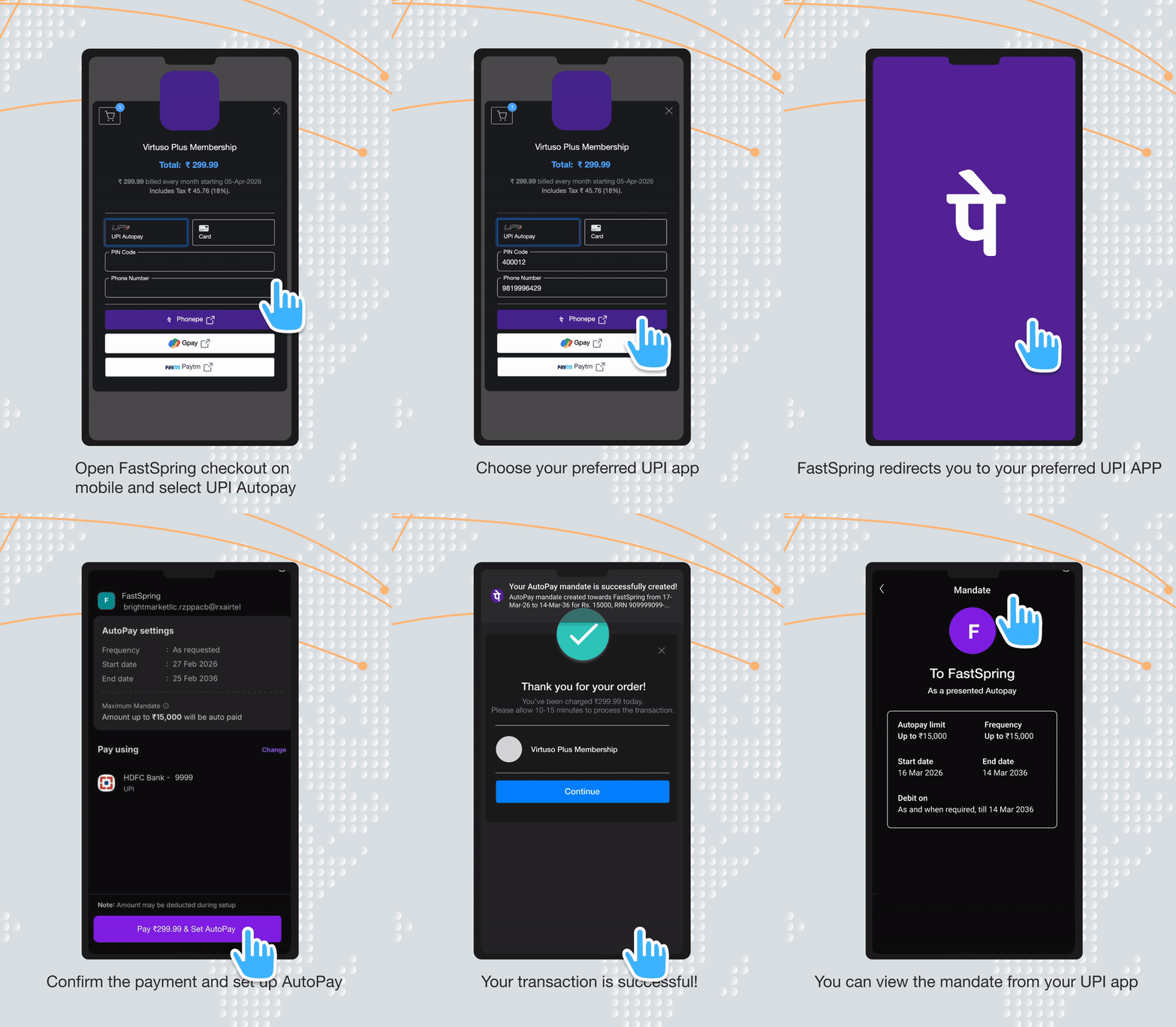
Initial purchase and mandate setup
- The buyer selects UPI as their payment method on a subscription product.
- FastSpring displays a QR code (desktop) or opens the buyer's chosen UPI app (mobile).
- The buyer authorizes a recurring payment mandate in their UPI app, granting permission for FastSpring to debit future renewals automatically. The mandate specifies the maximum debit amount and frequency.
- The buyer's UPI app and bank send native confirmation notifications about the mandate.
- The first charge is processed instantly, and the FastSpring checkout updates to show success.
Note: The bank descriptor on the mandate appears as FastSpring so buyers can recognize the source of future debits.
Automatic renewal
- Approximately 24 hours before the renewal date, FastSpring submits the rebill request to the processor. The buyer's UPI app and bank send a pre-debit notification.
- On the renewal date, funds are debited from the buyer's UPI-linked account and the buyer receives a debit notification.
- FastSpring receives the final payment status and updates the subscription. End-to-end charge completion typically takes up to 24 hours from when the request is submitted.
Note: UPI AutoPay renewals are processed asynchronously. Until the payment is confirmed, the charge entry remains in a Pending state in the FastSpring app.
Buyer notifications
Buyers using UPI AutoPay receive native notifications they may not see with other payment methods:
- A notification when the recurring mandate is created, sent by the buyer's UPI app and bank.
- A pre-debit notification approximately 24 hours before each renewal.
- A debit notification when each renewal charge is processed.
These notifications are issued by the buyer's UPI app, the buyer's bank, and the National Payments Corporation of India (NPCI). FastSpring does not generate or control these messages.
RBI mandate
UPI AutoPay is governed by recurring-payment guidelines set by the Reserve Bank of India (RBI), the central bank that regulates digital payments in India. These rules apply to all auto-debit transactions in India, not just UPI, and exist to protect buyers from unauthorized recurring charges.
The two RBI requirements that most directly affect UPI AutoPay are:
- Mandate authorization. Every UPI AutoPay subscription requires the buyer to explicitly authorize a recurring payment mandate in their UPI app before any auto-debit can occur. The mandate specifies the maximum debit amount and frequency.
- Express consent for renewals above INR 15,000. Auto-debits for renewal amounts greater than INR 15,000 require an Additional Factor of Authentication (AFA / 2FA) on every renewal. This limit applies to the rebill amount only — not to the initial purchase.
Important: The INR 15,000 limit is set by RBI and applies to recurring auto-debits across all payment methods in India, including cards. It is not a FastSpring-specific restriction.
Transaction limits
| Limit | Value |
|---|---|
| Minimum transaction value | INR 1 |
| Maximum transaction value | INR 100,000* |
| Daily transaction limit | INR 100,000 or INR 200,000 (varies by UPI app) |
| Auto-recurring limit | INR 15,000 per renewal |
*The maximum can be raised for individual sellers with approval. Contact FastSpring Support to request a review.
What happens when an auto-renewal exceeds INR 15,000
When a UPI AutoPay subscription is due to renew above INR 15,000:
- The scheduled rebill is rejected at the processor — no debit is attempted without 2FA.
- The subscription enters dunning following the UPI-specific dunning schedule (see Dunning).
- The buyer is notified of the failed renewal through standard payment-failure messaging.
- The buyer must visit their Account Management page (or your embedded payment component) and complete the payment manually, which satisfies the 2FA requirement for that charge.
- Once the manual payment succeeds, the subscription returns to good standing on its existing schedule.
Subscription edits and proration
UPI AutoPay enforces edit windows around scheduled charges to comply with banking rules that limit how often UPI charges can be retried.
Standard subscriptions
| Action | When it's allowed |
|---|---|
| Subscription upgrade (non-prorated) | After the previous charge has completed |
| Subscription upgrade (prorated) | After the previous charge has completed, and not within 48 hours of the next scheduled renewal |
| Off-cycle / proration charge (via API) | After the previous charge has completed, and not within 48 hours of the next scheduled renewal |
Managed subscriptions
| Action | When it's allowed |
|---|---|
| Initial seller-initiated charge | Anytime |
| Subsequent charge | After the previous charge has completed (typically within 24 hours) |
| Subscription upgrade | After the previous charge has completed |
While the subscription is in a blocked window, the Edit button is disabled in the FastSpring app and the API returns a structured error (see API reference).
Dunning
UPI AutoPay uses a dedicated dunning schedule that is independent of your store's standard card-and-PayPal dunning configuration.
Schedule rules
- Up to 3 retry attempts.
- Each attempt is configured as a number of days after the last payment (for example, 2 / 2 / 2 days).
- The total dunning window cannot exceed 7 days.
Notifications and cancellation
- Overdue notifications configured for the store fire on UPI AutoPay subscriptions before deactivation. For example, if you have 4 overdue notifications set every 3 days, all 4 notifications send before the subscription is deactivated.
- If a buyer updates their payment method during dunning — to a new UPI account or any other supported payment method — FastSpring uses the new method to immediately initiate the charge, ending the dunning sequence.
After dunning ends
If all retries are exhausted, the subscription is deactivated per your dunning configuration. Buyers can revive the subscription anytime by visiting their Account Management page and updating their payment method.
Refunds and disputes
Refunds for UPI AutoPay can be initiated by sellers or by FastSpring Support from within the FastSpring app. Funds are returned automatically to the buyer's UPI-linked account.
- Full and partial refunds are supported for completed UPI AutoPay charges.
- Refunds can be issued within 60 days of the original charge.
- Offline refunds are supported.
- FastSpring automatically checks payment status before issuing a refund.
- Buyers typically receive a refund within 5–7 business days, depending on their bank.
- Disputes are routed through the standard UPI dispute workflow.
API reference
UPI AutoPay uses the same subscription endpoints as other FastSpring payment methods. The differences are limited to edit-window enforcement and the errors returned when a request is rejected.
Endpoints
| Action | Method | Endpoint |
|---|---|---|
| Initiate or re-attempt a charge on a managed subscription | POST | /subscriptions/charge |
| Update a subscription (quantity, plan, add-on, proration) | POST | /subscriptions |
Proration handling
When a subscription update request includes prorate=true but proration is not currently permitted (for example, the previous charge is still processing or the subscription is within 48 hours of the next renewal), the request is rejected. The system does not silently downgrade to a non-prorated edit. Inspect the error payload, then either retry with prorate=false or wait until the window has cleared.
Examples
Initiate a managed-subscription charge
POST /subscriptions/charge{
"subscriptions": [
{ "subscription": "xMpL7uPs2dCbR3aBnQv8Tw" }
]
}{
"subscriptions": [
{
"subscription": "xMpL7uPs2dCbR3aBnQv8Tw",
"action": "subscription.charge",
"result": "success"
}
]
}{
"subscriptions": [
{
"subscription": "xMpL7uPs2dCbR3aBnQv8Tw",
"action": "subscription.charge",
"result": "error",
"error": {
"subscription": "Banking regulations limit UPI payment attempts to once every 48 hours. Please try after the pending payment is completed."
}
}
]
}Update a subscription without proration
POST /subscriptions{
"subscriptions": [
{
"subscription": "kRn5gFz_2bMpQwVx8jHyCd",
"quantity": 7,
"prorate": false
}
]
}{
"subscriptions": [
{
"action": "subscription.update",
"result": "success",
"subscription": "kRn5gFz_2bMpQwVx8jHyCd"
}
]
}Update a subscription with proration
POST /subscriptions{
"subscriptions": [
{
"subscription": "kRn5gFz_2bMpQwVx8jHyCd",
"quantity": 8,
"prorate": true
}
]
}{
"subscriptions": [
{
"action": "subscription.update",
"result": "success",
"subscription": "kRn5gFz_2bMpQwVx8jHyCd"
}
]
}{
"subscriptions": [
{
"action": "subscription.update",
"subscription": "kRn5gFz_2bMpQwVx8jHyCd",
"result": "error",
"error": {
"subscription": "Due to banking regulations, subscription update is not allowed until Fri May 01, 2026."
}
}
]
}Webhooks
FastSpring includes the following details in the order.completed webhook payload for UPI AutoPay transactions:
"payment": {
  "type": "upi",
  "variant": "upiphonepe"
}
The variant field reflects the specific UPI app the buyer used to complete the payment. Possible values include:
upigpayupiphonepeupipaytmupidesktop
The standard subscription lifecycle webhooks also fire for UPI AutoPay:
subscription.charge.completed— fires when a UPI AutoPay rebill settles successfully.subscription.charge.failed— fires when the renewal is declined (for example, on renewals above INR 15,000 or when the buyer's bank rejects the mandate).subscription.payment.overdue— fires when a renewal enters dunning.
For details on the order.completed payload, see the Successful Orders documentation.
FAQs
Why does the auto-renewal request go out a day before the charge date?
RBI rules require the payment mandate request to be sent at least 24 hours before the actual debit so that the buyer's bank and UPI app can issue a pre-debit notification. FastSpring submits the rebill the day before each renewal to comply.
What happens if a renewal is above INR 15,000?
Per the RBI mandate, recurring auto-debits above INR 15,000 require buyer 2FA for every renewal. FastSpring rejects the scheduled rebill and places the subscription in dunning. The buyer must complete the payment manually from their Account Management page, which satisfies the 2FA requirement.
Does the INR 15,000 limit apply to the first purchase?
No. The INR 15,000 limit applies only to automated renewals. Initial purchases can exceed INR 15,000 without triggering the 2FA requirement, up to the FastSpring maximum of INR 100,000 (or higher if approved for your store).
Why are subscription edits blocked near the renewal date?
Once the rebill request has been queued, the renewal cannot be modified without conflicting with the bank's pre-debit notification to the buyer. Edits and proration are blocked within 48 hours of the next scheduled renewal and become available again after the renewal completes.
Why does my buyer receive notifications I haven't sent?
UPI AutoPay buyers receive native notifications from their UPI app, their bank, and NPCI when the mandate is created, before each renewal, and when the charge is debited. FastSpring does not generate these messages. The bank descriptor reads FastSpring so buyers can recognize the source of the charge.
Does FastSpring support refunds for UPI AutoPay?
Yes. You can refund UPI AutoPay charges directly from the FastSpring app. Offline refunds are supported. Buyers typically receive a refund within 5–7 business days, depending on their bank.
Does UPI AutoPay use my regular dunning settings?
No. UPI AutoPay has a dedicated dunning schedule, configured in Settings > Payments > Pix / UPI Recurring. It supports up to 3 retries within a 7-day window. See Dunning for details.
What happens if a buyer updates their payment method during dunning?
FastSpring uses the new payment method to immediately initiate the charge, ending the dunning sequence. The buyer can switch to a different UPI account or to any other supported payment method on your store.
Updated 5 months ago