
Manage payment methods
Enable, disable, and configure payment methods for your store. Manage which options appear at checkout, set transaction limits, and configure features like One Click Pay and dunning intervals.
Only Administrators and Store Administrators have access to this page. See Manage roles and permissions for details.
Use the Payment Methods settings page to control which payment options are available to buyers at checkout. The page includes a curated set of Global payment methods (available to all buyers) and Local payment methods (region-specific), each with its own settings panel.
Scroll right to see more examples.
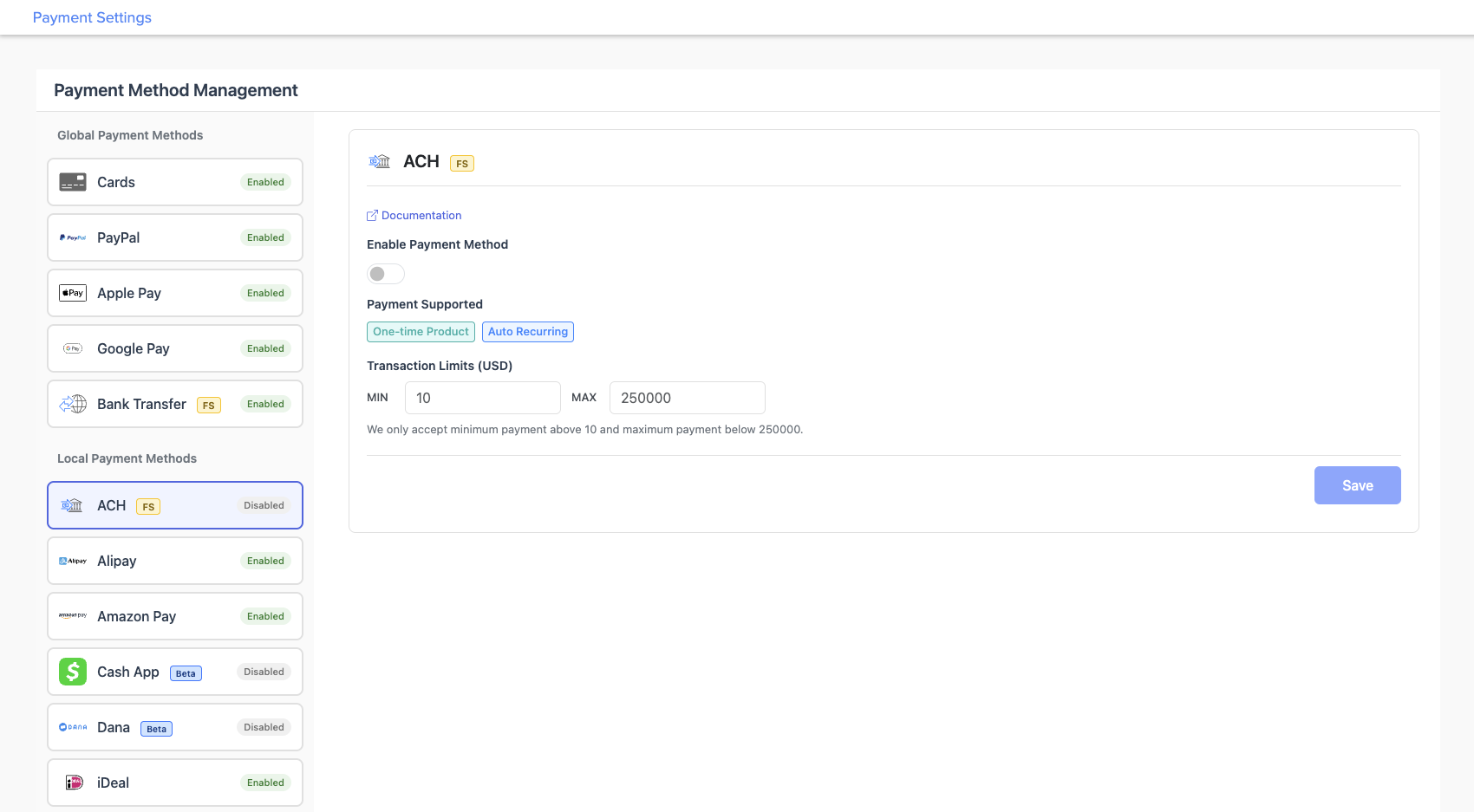
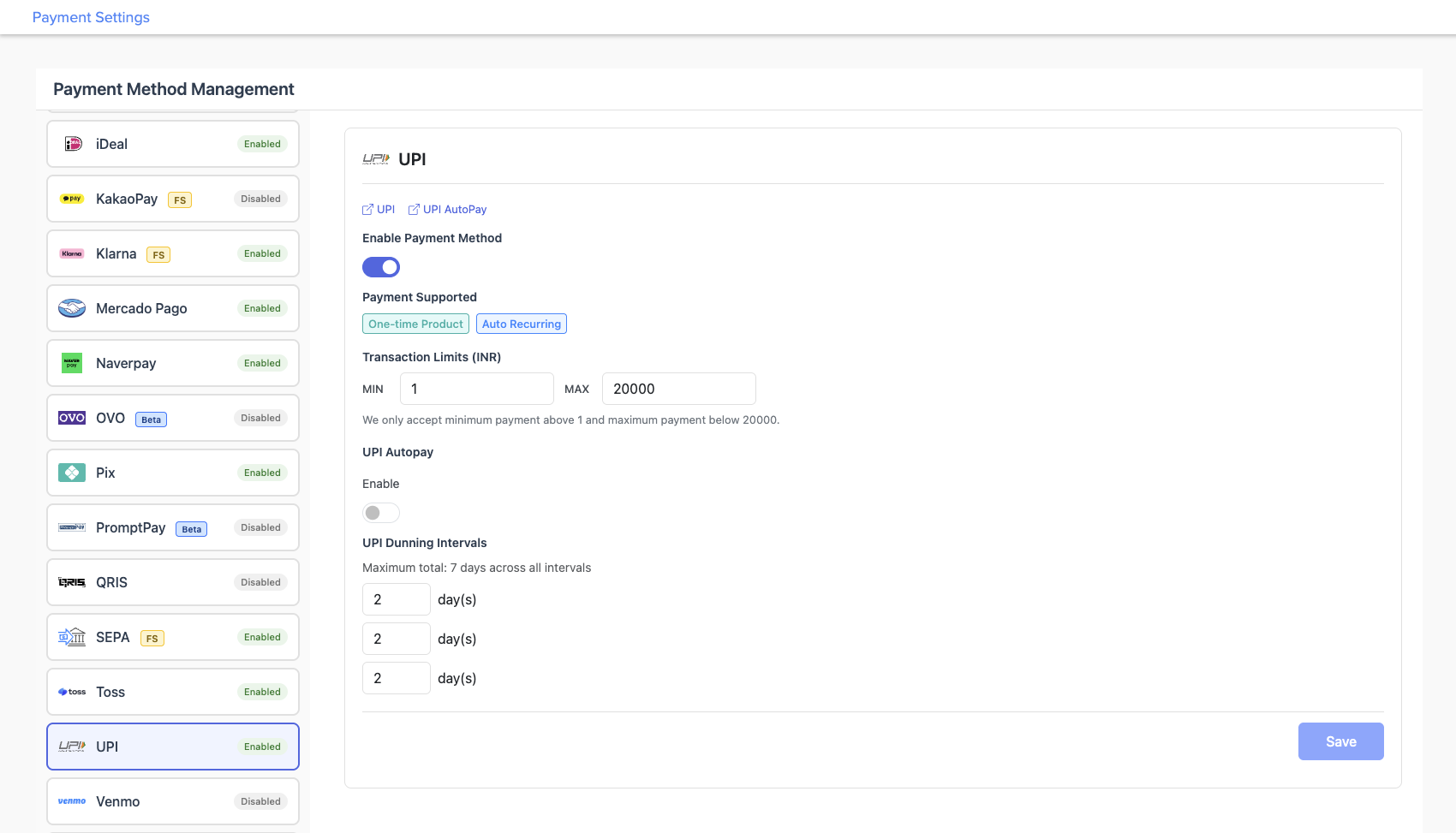
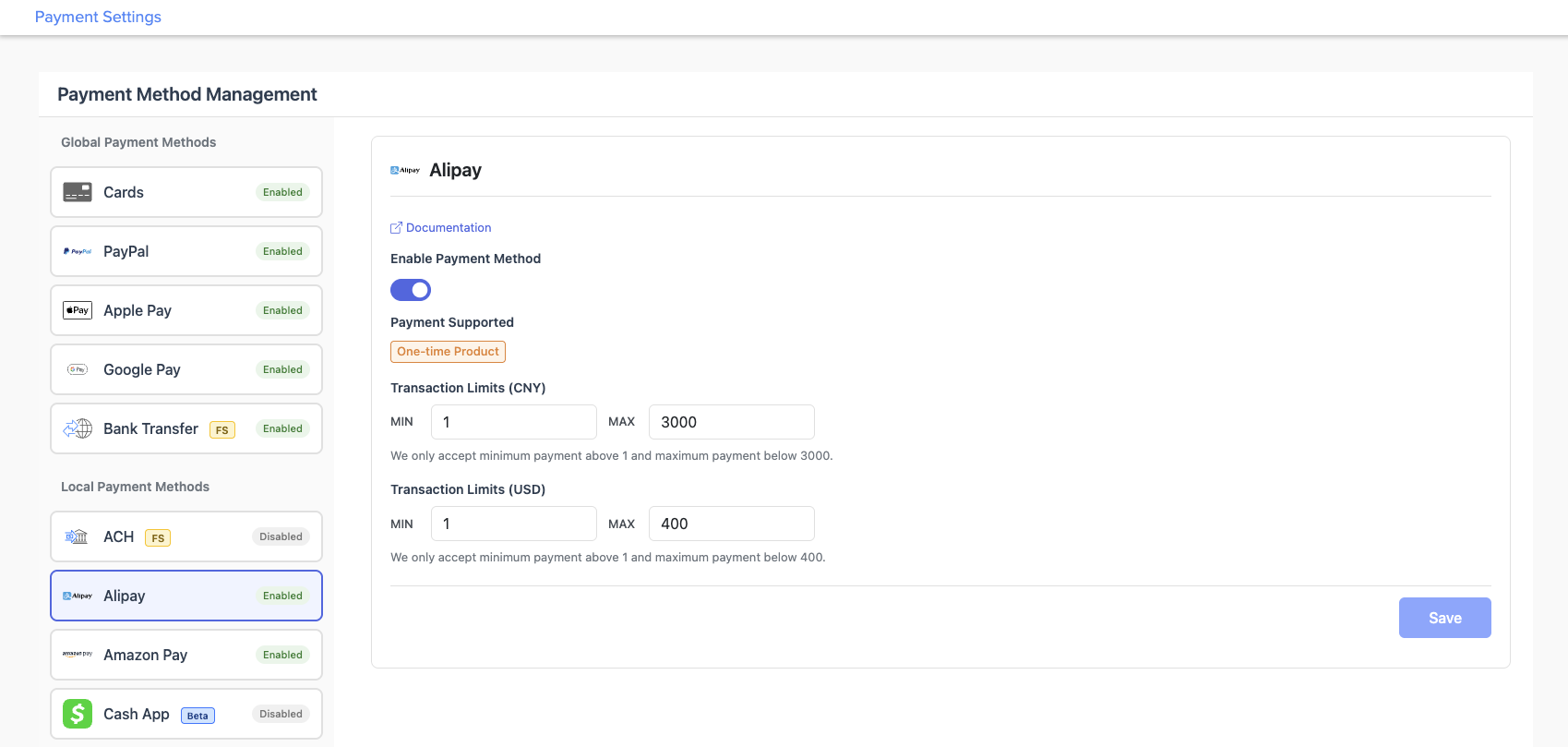
Every payment method includes an Enable Payment Method toggle. Some payment methods also support additional settings, such as transaction limits, One Click Pay, or dunning intervals, while others are enabled or disabled only.
Payment methods marked FS are managed by FastSpring with read-only configuration. To make changes, contact FastSpring Support. Payment methods marked Beta are available but still in active development.
Turn individual payment methods on or off for your store.
Cards, PayPal, Apple Pay, Google Pay, and Bank Transfer.
Region-specific options including ACH, Alipay, Pix, UPI, and more.
Supported countries and currencies by payment method.
Enable or disable a payment method
Select a payment method from the left panel to open its settings, then follow these steps to turn it on or off.
For FS payment methods, contact FastSpring Support instead of using these steps.
Select a payment method
In the left panel, select the payment method you want to change.
Toggle the payment method on or off
In the right panel, toggle Enable Payment Method on or off.
Save your changes
Click Save.
The following local payment methods have no additional settings. Enabling or disabling them is the only configuration available.
| Payment Method | Payment Supported |
|---|---|
| Amazon Pay | One-time Product, Auto Recurring |
| iDeal | One-time Product |
| Mercado Pago | One-time Product |
| Toss Pay | One-time Product |
| Venmo | One-time Product, Auto Recurring |
Global payment methods
These are the most widely accepted payment methods at checkout, available to buyers in any region. Each one has a settings panel where you can enable or disable it and configure options such as transaction limits and One Click Pay.
Cards
The most widely used payment method worldwide. Accepts major credit and debit cards and supports One Click Pay for returning buyers.
Payment Supported: One-time Product, Auto Recurring
One Click Pay:
Allows returning buyers to complete a purchase without re-entering their payment details.
- Under One Click Pay, toggle Enable on or off.
- Click Save.
PayPal
A global digital wallet with hundreds of millions of active users. Supports One Click Pay for returning buyers.
Payment Supported: One-time Product, Auto Recurring
One Click Pay:
Allows returning buyers to complete a purchase without re-entering their payment details.
- Under One Click Pay, toggle Enable on or off.
- Click Save.
Apple Pay (FS)
Native Apple Pay for buyers on Safari and Apple devices. Managed by FastSpring. Advanced settings are read-only.
Payment Supported: One-time Product, Auto Recurring
Advanced settings (read-only):
The following settings control how Apple Pay behaves at checkout. To request changes, contact FastSpring Support.
| Setting | Description |
|---|---|
| Show other payment methods behind expand button | Hides other payment methods under an expandable button when Apple Pay is available. |
| For unsupported browsers, show QR code to continue on an Apple device | Displays a QR code so buyers on non-Apple browsers can complete payment on an Apple device. |
| Use embedded Apple Pay widget and pre-select ApplePay | Embeds the Apple Pay widget in the checkout flow and pre-selects it as the default. |
| Use embedded native Apple Pay | Uses the native Apple Pay button instead of the FastSpring-styled widget. |
Google Pay
One-tap payments for Android and Chrome users with stored card details.
Payment Supported: One-time Product, Auto Recurring
Bank Transfer (FS)
Direct bank account payments suited for high-value transactions. Managed by FastSpring.
Payment Supported: One-time Product
Transaction limits:
Minimum: $750 USD (read-only). To adjust, contact FastSpring Support.
Local payment methods
These payment methods are region-specific and only appear to buyers in supported countries. Each one has a settings panel with additional options you can configure. See Payment methods accepted for coverage by country.
ACH (FS)
US bank-to-bank transfers. Common for SaaS and subscription businesses serving US customers. Managed by FastSpring.
Payment Supported: One-time Product, Auto Recurring
Transaction limits:
| Currency | MIN | MAX |
|---|---|---|
| USD | 10 | 250,000 |
Read-only. To adjust limits, contact FastSpring Support.
Alipay
China's leading digital payment platform. Buyers pay via QR code or the Alipay mobile app.
Payment Supported: One-time Product
Transaction limits:
Configure the minimum and maximum amounts accepted per transaction.
| Currency | MIN | MAX |
|---|---|---|
| CNY | 1 | 3,000 |
| USD | 1 | 400 |
- In the MIN and MAX fields, enter your preferred amounts.
- Click Save.
BACS (Beta)
UK bank-to-bank direct debits for enterprise buyers. Payments are not real-time and typically complete within 3–5 business days.
Payment Supported: One-time Product, Auto Recurring
Transaction limits:
Configure the minimum and maximum amounts accepted per transaction.
| Currency | MIN | MAX |
|---|---|---|
| GBP | 1 | 5,000 |
- In the MIN and MAX fields, enter your preferred amounts.
- Click Save.
Cash App
A peer-to-peer payment app popular in the US, particularly with younger buyers. Supports One Click Pay.
Payment Supported: One-time Product, Auto Recurring
Business Category (required):
Select a category before enabling Cash App. This is required for enrollment.
- Digital Gaming / Software
- E-commerce / Software Stores
One Click Pay:
Allows returning buyers to complete a purchase without re-entering their payment details.
To configure and enable Cash App:
- Under Business Category, select your business type.
- Under One Click Pay, toggle Enable on or off if desired.
- Toggle Enable Payment Method on.
- Click Save.
Dana (Beta)
A digital wallet widely used in Indonesia.
Payment Supported: One-time Product
Transaction limits:
Configure the minimum and maximum amounts accepted per transaction.
| Currency | MIN | MAX |
|---|---|---|
| IDR | 300 | 2,000,000 |
- In the MIN and MAX fields, enter your preferred amounts.
- Click Save.
KakaoPay (FS)
South Korea's leading mobile payment platform, integrated with KakaoTalk. Managed by FastSpring.
Payment Supported: One-time Product
Transaction limits:
| Currency | MIN | MAX |
|---|---|---|
| KRW | 1,000 | 500,000 |
| USD | 1 | 350 |
Read-only. To adjust limits, contact FastSpring Support.
Klarna (FS)
A buy-now-pay-later option popular across Europe and North America. Managed by FastSpring.
Payment Supported: One-time Product
Toggle and configuration are managed by FastSpring. Contact FastSpring Support to request changes.
Naverpay (Beta)
A mobile payment service integrated with South Korea's Naver platform.
Payment Supported: One-time Product
Transaction limits:
Configure the minimum and maximum amounts accepted per transaction.
| Currency | MIN | MAX |
|---|---|---|
| KRW | 100 | 2,000,000 |
- In the MIN and MAX fields, enter your preferred amounts.
- Click Save.
OVO (Beta)
A popular digital wallet and financial services app in Indonesia.
Payment Supported: One-time Product
Transaction limits:
Configure the minimum and maximum amounts accepted per transaction.
| Currency | MIN | MAX |
|---|---|---|
| IDR | 1 | 2,000,000 |
- In the MIN and MAX fields, enter your preferred amounts.
- Click Save.
PAD (Beta)
Pre-Authorized Debit (PAD) documentation →
Canadian bank-to-bank pre-authorized debits for enterprise buyers. Payments are not real-time and typically complete within 3–5 business days.
Payment Supported: One-time Product, Auto Recurring
Transaction limits:
Configure the minimum and maximum amounts accepted per transaction.
| Currency | MIN | MAX |
|---|---|---|
| CAD | 2 | 5,000 |
- In the MIN and MAX fields, enter your preferred amounts.
- Click Save.
Pix
Pix documentation → | Pix Automatico documentation →
Brazil's national instant payment system, operated by the Central Bank of Brazil. Supports one-time and recurring payments.
Payment Supported: One-time Product, Auto Recurring
Pix dunning intervals:
Configure up to three automatic retry intervals for failed recurring payments. The combined total across all intervals cannot exceed 7 days.
- Update the interval fields under Pix Dunning Intervals.
- Click Save.
PromptPay
Thailand's national instant payment system, linking bank accounts to a phone number or national ID.
Payment Supported: One-time Product
Transaction limits:
Configure the minimum and maximum amounts accepted per transaction.
| Currency | MIN | MAX |
|---|---|---|
| THB | 1 | 100,000 |
- In the MIN and MAX fields, enter your preferred amounts.
- Click Save.
QRIS (Beta)
Indonesia's national QR code payment standard, enabling instant payments across participating banks and e-wallets.
Payment Supported: One-time Product
Transaction limits:
Configure the minimum and maximum amounts accepted per transaction.
| Currency | MIN | MAX |
|---|---|---|
| IDR | 1 | 10,000,000 |
- In the MIN and MAX fields, enter your preferred amounts.
- Click Save.
SEPA (FS)
The standard bank transfer payment method across the Eurozone. Managed by FastSpring.
Payment Supported: One-time Product, Auto Recurring
Toggle and configuration are managed by FastSpring. Contact FastSpring Support to request changes.
UPI
UPI documentation → | UPI AutoPay documentation →
India's unified payments interface for instant bank-to-bank transfers. Supports one-time and recurring payments via UPI Autopay.
Payment Supported: One-time Product, Auto Recurring
Transaction limits:
Configure the minimum and maximum amounts accepted per transaction.
| Currency | MIN | MAX |
|---|---|---|
| INR | 1 | 20,000 |
- In the MIN and MAX fields, enter your preferred amounts.
- Click Save.
UPI Autopay:
When enabled, buyers can authorize recurring charges directly from their UPI-linked account.
- Under UPI Autopay, toggle Enable on or off.
- Click Save.
UPI dunning intervals:
Configure up to three automatic retry intervals for failed recurring payments. The combined total cannot exceed 7 days.
- Update the interval fields under UPI Dunning Intervals.
- Click Save.
VietQR (Beta)
Vietnam's national QR code standard for instant bank-to-bank transfers.
Payment Supported: One-time Product
Transaction limits:
Configure the minimum and maximum amounts accepted per transaction.
| Currency | MIN | MAX |
|---|---|---|
| VND | 2,000 | 499,000,000 |
- In the MIN and MAX fields, enter your preferred amounts.
- Click Save.
WeChat Pay (FS)
China's most widely used mobile payment platform, integrated with WeChat. Managed by FastSpring.
Payment Supported: One-time Product
Citcon sub-merchant credential (required):
WeChat Pay requires a Citcon sub-merchant credential to process transactions. Without it, WeChat Pay cannot be used even if the payment method is enabled.
- Obtain your sub-merchant credential from Citcon.
- Enter it in the Citcon Sub-Merchant Credential field.
- Click Save.
Transaction limits:
| Currency | MIN | MAX |
|---|---|---|
| CNY | 1 | 3,000 |
| USD | 1 | 400 |
Read-only. To adjust limits, contact FastSpring Support.
Yape (Beta)
A mobile payment app in Peru, operated by BCP (Banco de Crédito del Perú).
Payment Supported: One-time Product
Transaction limits:
Configure the minimum and maximum amounts accepted per transaction.
| Currency | MIN | MAX |
|---|---|---|
| PEN | 1 | 2,000 |
- In the MIN and MAX fields, enter your preferred amounts.
- Click Save.
Related resources
Explore related documentation for your payment setup.
Updated 9 days ago