
Pix Automatico
FastSpring supports Pix Automatico for fully automated subscription renewals in Brazil.
Pix Automatico is not enabled by default. Contact FastSpring Support to enable it for your store.
Pix Automatico extends Brazil's instant-payment system Pix to support auto-renewing subscriptions. Subscriptions are charged automatically against a recurring authorization the buyer approves in their bank's Pix app at the time of the initial purchase.
Pix Automatico is available only in Brazil using BRL. It is offered alongside one-time Pix as a localized payment option for sellers who want to offer recurring billing to Brazilian buyers.
The sections below explain the prerequisites, buyer flow, and technical details for Pix Automatico. Select a section or use the TOC on the right to jump ahead.
Requirements to use Pix Automatico
Authorization and renewal flow
Brazilian Central Bank rules
Limits and edit windows
Edit windows and proration
Pix-only dunning schedule
How refunds are processed
Endpoints, payloads, and errors
Pix Automatico webhook events
Answers to common questions
Prerequisites
To use Pix Automatico, the following requirements must be met:
- The buyer must be in Brazil and the store currency must be set to BRL.
- Pix Automatico must be enabled on your store. Contact FastSpring Support to request enablement.
- The product must be configured as an auto-renewing subscription. Weekly billing periods are not supported.
- The buyer must have a bank account with a Brazilian institution that supports Pix Automatico, and must approve the recurring authorization in their bank's Pix app at checkout.
Customer experience
Pix Automatico is an asynchronous payment method. The initial setup completes quickly, but renewals take longer to settle and follow strict timing rules set by the Brazilian banking system.
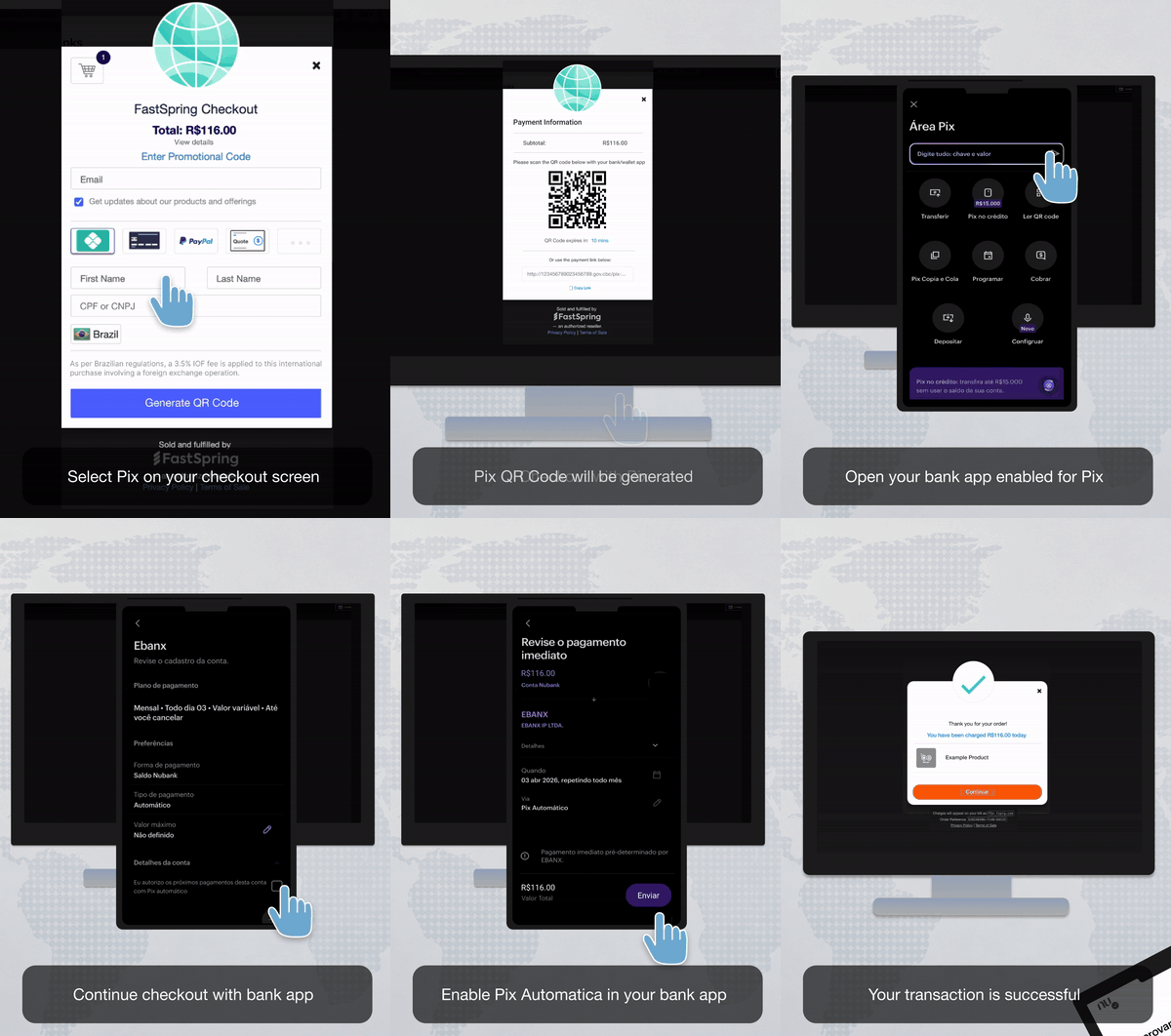
Initial purchase and authorization setup
- The buyer selects Pix as their payment method on a subscription product.
- FastSpring displays a Pix QR code or copy-and-paste key.
- The buyer authorizes the recurring Pix agreement in their bank's Pix app, granting permission for FastSpring to debit future renewals automatically.
- The first charge is processed and confirmed.
- The FastSpring checkout updates to show success once the buyer's bank confirms the payment.
Automatic renewal
- Up to 48 hours before the renewal date, FastSpring submits the rebill request to the processor and the charge is queued.
- On the renewal date, the buyer's bank captures the payment.
- Within 48 hours of the renewal date, FastSpring receives the final payment status and updates the subscription. End-to-end charge completion typically takes up to 48 hours.
Note: Pix Automatico renewals are processed asynchronously. Until the payment is confirmed, the charge entry remains in a Pending state in the FastSpring app.
Buyer notifications
Buyers receive native notifications from their bank's Pix app at each step:
- Confirmation of the recurring authorization at signup.
- A pre-debit notification before each renewal.
- A debit confirmation after each successful charge.
These messages are issued by the buyer's bank and the Brazilian Pix network. FastSpring does not generate or control them.
Banking regulations
Pix Automatico is governed by recurring-payment rules set by the Banco Central do Brasil (BCB) and operated through the Pix network. The constraints below come directly from those rules and are not configurable per seller.
- No proration. Pix Automatico does not support prorated subscription edits. Off-cycle (proration) charges are not permitted.
- Maximum 3 charge attempts in any 7-day window. This applies across both initial charges and dunning retries.
- Pre-charge edit window. Once a charge is queued, no edits can be made for 72 hours before the scheduled charge date.
- Post-charge edit window. After a successful charge, the subscription is in a 7-day window during which subscription edits are blocked.
Transaction limits
| Limit | Value |
|---|---|
| Currency | BRL |
| Region | Brazil |
| Billing period | Monthly or annual (daily and weekly not supported) |
| Maximum charge attempts | 3 attempts per 7-day window |
| Managed-subscription charge cadence | 1 payment per 7-day window |
| Pre-charge edit window | 72 hours before scheduled charge |
| Post-charge edit window | 7 days after successful charge |
| Typical charge completion | Up to 48 hours from initiation |
Subscription edits and proration
Subscription edits are only permitted in the window between the post-charge and pre-charge edit periods.
Standard subscriptions
| Action | When it's allowed |
|---|---|
| Subscription upgrade (non-prorated) | Outside both edit windows: previous charge has completed at least 7 days ago and the next scheduled charge is more than 72 hours away |
| Subscription upgrade (prorated) | Never allowed — proration is not supported for Pix Automatico |
| Off-cycle / proration charge | Never allowed — off-cycle charges are not supported by the Pix network |
For a typical 30-day subscription, the editable window is roughly Day 7 through Day 27 of each cycle.
Managed subscriptions
| Action | When it's allowed |
|---|---|
| Initial seller-initiated charge | Anytime, up to 1 payment per 7-day window |
| Subsequent charge | After the previous charge has completed and the 7-day window has passed |
| Subscription upgrade | Outside the post-charge edit window |
| Proration | Never allowed — managed subscriptions don't have a next charge date, so proration is not applicable |
While the subscription is in a blocked window, the Edit button is disabled in the FastSpring app and the API returns a structured error (see API reference).
Dunning
Pix Automatico uses a dedicated dunning schedule that is independent of your store's standard card-and-PayPal dunning configuration.
Schedule rules
- Recurring Pix must be enabled at the store level.
- Up to 3 retry attempts.
- Each attempt is configured as a number of days after the last payment (for example, 2 / 2 / 2 days).
- The total dunning window cannot exceed 7 days.
Notifications and cancellation
- Overdue notifications configured for the store fire on Pix Automatico subscriptions before deactivation. For example, if you have 4 overdue notifications set every 3 days, all 4 notifications send before the subscription is deactivated.
- If a buyer updates their payment method during dunning — to a re-authorized Pix agreement or any other supported payment method — FastSpring uses the new method to immediately initiate the charge, ending the dunning sequence.
After dunning ends
If all retries are exhausted within the 7-day window, the subscription is deactivated per your dunning configuration. Buyers can revive the subscription anytime by visiting their Account Management page and updating their payment method.
Refunds and disputes
Refunds for Pix Automatico can be initiated by sellers or by FastSpring Support from within the FastSpring app.
- Full and partial refunds are supported for completed Pix Automatico charges.
- Offline refunds are supported.
- FastSpring automatically checks payment status before issuing a refund.
- Buyers typically receive a refund within 1–3 business days to the bank account associated with the original Pix authorization.
- Disputes are routed through the standard Pix dispute workflow.
API reference
Pix Automatico uses the same subscription endpoints as other FastSpring payment methods. The differences are limited to edit-window enforcement and the errors returned when a request is rejected. Most notably, any request that asks for proration on a Pix subscription is rejected.
Endpoints
| Action | Method | Endpoint |
|---|---|---|
| Initiate a charge on a managed subscription | POST | /subscriptions/charge |
| Update a subscription (quantity, plan, add-on) | POST | /subscriptions |
Proration handling
Subscription update requests with prorate=true are always rejected for Pix Automatico subscriptions. The system does not silently downgrade to a non-prorated edit. Always send prorate=false for Pix subscriptions, or branch on payment method when constructing the request.
Examples
Initiate a managed-subscription charge
POST /subscriptions/charge{
"subscriptions": [
{ "subscription": "dQp8vBnZ7tRcMkXy3wHj1G" }
]
}{
"subscriptions": [
{
"subscription": "dQp8vBnZ7tRcMkXy3wHj1G",
"action": "subscription.charge",
"result": "success"
}
]
}{
"subscriptions": [
{
"subscription": "dQp8vBnZ7tRcMkXy3wHj1G",
"action": "subscription.charge",
"result": "error",
"error": {
"subscription": "A Pix payment is already in progress. Due to banking regulations, a new payment cannot be attempted at this time. Please retry after 6:05 AM UTC on Sat May 09, 2026."
}
}
]
}Update a subscription without proration
POST /subscriptions{
"subscriptions": [
{
"subscription": "nFc4hWqL5yPbRtZx9mKj2D",
"quantity": 2,
"prorate": false
}
]
}{
"subscriptions": [
{
"action": "subscription.update",
"result": "success",
"subscription": "nFc4hWqL5yPbRtZx9mKj2D"
}
]
}{
"subscriptions": [
{
"action": "subscription.update",
"subscription": "nFc4hWqL5yPbRtZx9mKj2D",
"result": "error",
"error": {
"subscription": "Due to banking regulations, subscription update is not allowed until 5/26/2026."
}
}
]
}Update a subscription with proration
POST /subscriptions{
"subscriptions": [
{
"subscription": "nFc4hWqL5yPbRtZx9mKj2D",
"quantity": 2,
"prorate": true
}
]
}{
"subscriptions": [
{
"action": "subscription.update",
"subscription": "nFc4hWqL5yPbRtZx9mKj2D",
"result": "error",
"error": {
"subscription": "Proration is not supported for this payment method type. Set proration to false or choose a supported method."
}
}
]
}Webhooks
FastSpring includes the following details in the order.completed webhook payload for Pix Automatico transactions:
"payment": {
  "type": "pix"
}
The standard subscription lifecycle webhooks also fire for Pix Automatico:
subscription.charge.completed— fires when a Pix Automatico rebill settles successfully (typically within 48 hours of the request).subscription.charge.failed— fires when the buyer's bank declines the charge or the recurring authorization has been revoked.subscription.payment.overdue— fires when a renewal enters dunning. Dunning runs for up to 7 days with up to 3 retry attempts, after which the subscription is deactivated per your dunning configuration.
For details on the order.completed payload, see the Successful Orders documentation.
FAQs
Why doesn't Pix Automatico support proration?
The Pix network does not allow off-cycle charges on a recurring authorization. Because proration requires charging a partial amount immediately when the subscription changes, it cannot be implemented on Pix. Updates to Pix subscriptions take effect on the next regular renewal.
Why are Pix subscription edits blocked for so long?
Pix Automatico has both a 72-hour pre-charge edit window and a 7-day post-charge edit window. These windows come from the Brazilian banking system and exist to keep retry counts under the 3-attempts-per-7-days limit. For a 30-day subscription, edits are typically allowed only between Day 7 and Day 27 of each cycle.
Why can't I use Pix Automatico for weekly subscriptions?
The 7-day post-charge window overlaps the entire billing cycle for weekly subscriptions, which would block all edits and retries. Weekly billing is not available for Pix Automatico.
What happens after 3 failed attempts in 7 days?
Dunning ends after 3 attempts within the 7-day window. The subscription is deactivated per your dunning configuration. The buyer can still revive the subscription by visiting their Account Management page and updating their payment method or re-authorizing Pix Automatico.
Does Pix Automatico use my regular dunning settings?
No. Pix Automatico has a dedicated dunning schedule, configured in Settings > Payments > Pix / UPI Recurring. It supports up to 3 retries within a 7-day window. The Pix dunning configuration is currently behind a feature flag. See Dunning for details.
What happens if a buyer updates their payment method during dunning?
FastSpring uses the new payment method to immediately initiate the charge, ending the dunning sequence. The buyer can re-authorize Pix Automatico or switch to any other supported payment method on your store.
Does FastSpring support refunds for Pix Automatico?
Yes. You can refund Pix Automatico charges directly from the FastSpring app. Offline refunds are supported. Buyers typically receive a refund within 1–3 business days, depending on their bank.
What happens if the buyer's bank doesn't respond to the rebill in time?
If the bank does not respond within the expected window, the renewal is treated as failed and the subscription is placed into dunning per your dunning configuration. If a prorated change had been provisionally applied, the upgrade is reverted on the next renewal cycle.
Updated 4 months ago