
OVO
FastSpring supports OVO as a payment method from Indonesia.
OVO gives Indonesian buyers a secure, convenient, and local way to make payments using their OVO wallet. FastSpring offers OVO as a payment option to buyers from Indonesia purchasing in IDR (Indonesian Rupiah), from all browsers and devices.
The sections below explain the availability, buyer flow, and technical details for OVO. Select a section or use the TOC on the right to jump ahead.
Prerequisites
To use OVO, the following requirements must be met:
- The buyer must be in Indonesia and the transaction currency must be IDR (Indonesian Rupiah).
- The order amount must be greater than IDR 1,000.
- The buyer must have an active OVO account linked to an active Indonesian phone number.
Warning: OVO is not supported for subscription purchases. FastSpring supports OVO for one-time products and manual recurring purchases only.
Customer experience
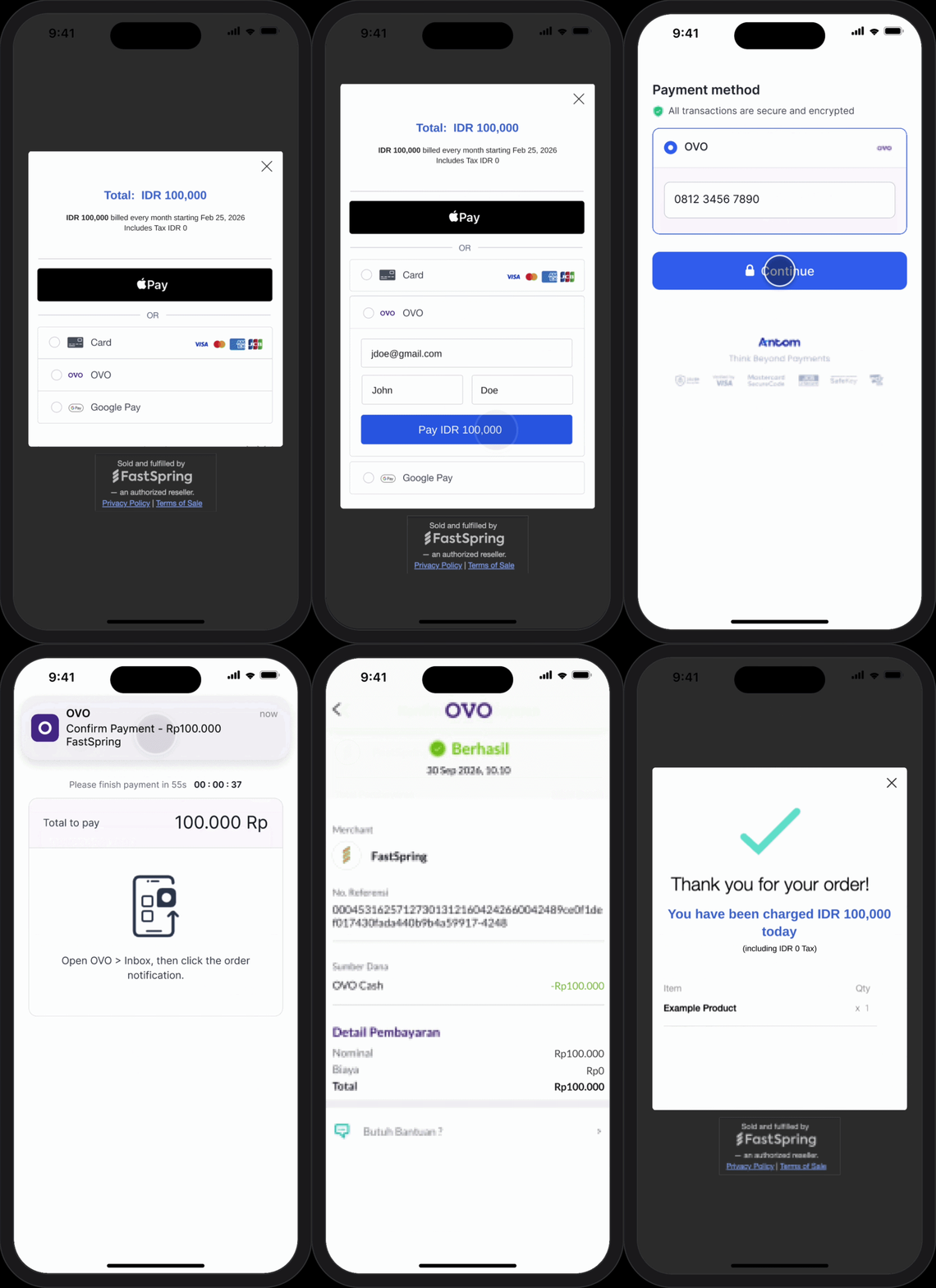
Here is the FastSpring OVO experience for buyers:
- The buyer selects OVO as their payment option during checkout.
- FastSpring prompts the buyer for required personal details (a session is automatically created if details are already known).
- FastSpring redirects the buyer to the Alipay+ partner page.
- The buyer enters their phone number on the partner page. The partner then sends a push notification to the buyer's OVO app.
- The buyer opens the OVO app and approves the transaction. The buyer has 60 seconds to approve and complete the transaction (the standard timeline set by OVO). During this time, the transaction status is Pending payment.
- If the transaction is not completed within 60 seconds, FastSpring automatically cancels it.
- Once the buyer approves and completes the payment in the OVO app, the buyer returns to the checkout page, where FastSpring displays a completed order confirmation. The buyer is also notified of the charge.
Manual return to checkout: After approving the payment in the OVO app, the buyer must switch back to the original checkout page to see the completed order confirmation.
Refunds and returns
OVO does not support refunds. All sales completed with OVO are final.
Webhooks
FastSpring includes the following field in the order.completed webhook payload when an order is completed with OVO:
"payment": {
  "type": "ovo"
}
For more information on the order.completed webhook, see the Successful Orders documentation.
FAQs
Can OVO be used for subscription purchases?
No. FastSpring supports OVO for one-time products and manual recurring purchases only.
Is OVO enabled by default?
Yes. OVO is automatically enabled for all FastSpring sellers.
Is OVO a real-time payment method?
Yes. Buyers must approve the payment in their OVO app within 60 seconds. FastSpring has developed an automated reconciliation process to track and complete any orders that don't complete in real time.
Does OVO support refunds?
No. OVO does not support refunds. All sales are final.
Updated 20 days ago